Portfolio Project

Help Center Analytics & FAQ Workflow in one dashboard

A Google Apps Script dashboard that pulls Zendesk Guide articles, GA4 Help Center search data, article performance, content gaps, and FAQ draft approvals into Google Sheets and a lightweight web app.

Google Apps Script Zendesk Guide API GA4 Data API Google Sheets Slack Review
Zendesk GuideArticles, categories, votes, labels, content body
96
GA4 Help CenterSearch demand, article views, engagement, gaps
1.2k
FAQ
FAQ WorkflowDraft docs, Slack review, approved sync to master doc
9

Live Simulation

Click to simulate pulling reports and refreshing dashboard metrics with mock data.

Total ArticlesTracker
96
Search EventsGA4
742
Article ViewsGA4
5,680
Content GapsPriority
12

Console Output

Idle
Waiting for dashboard sync simulation...

Dashboard Preview

Sample data
Top Searchreset account password
64
Top ArticleHow to update your account details
812
FAQ DraftsApproved 4 | Revision 1
7
Helpful Rate278 total votes
81.2%

Top Search Demand and Content Gaps

5 rows
Search Query Search Count Best Article Coverage Action

How It Works

The production web app runs inside Apps Script and writes all outputs to Google Sheets.

Pull Zendesk articles
syncZendeskGuideToSheets()
// Dashboard, Tracker, Full Content, Sync Log
Pull GA4 metrics
syncGA4HelpCenterDashboard()
// Search Queries, Article Pages, Content Gaps
Review FAQ drafts
sendFAQReviewToSlack(faqId)
// Approve, Request Revision, Open Doc

Real Implementation Evidence

Screenshots from the deployed Apps Script web app, Slack review flow, and generated Google Sheets dashboard.

Add screenshot: docs/assets/evidence/web-overview-dashboard.png
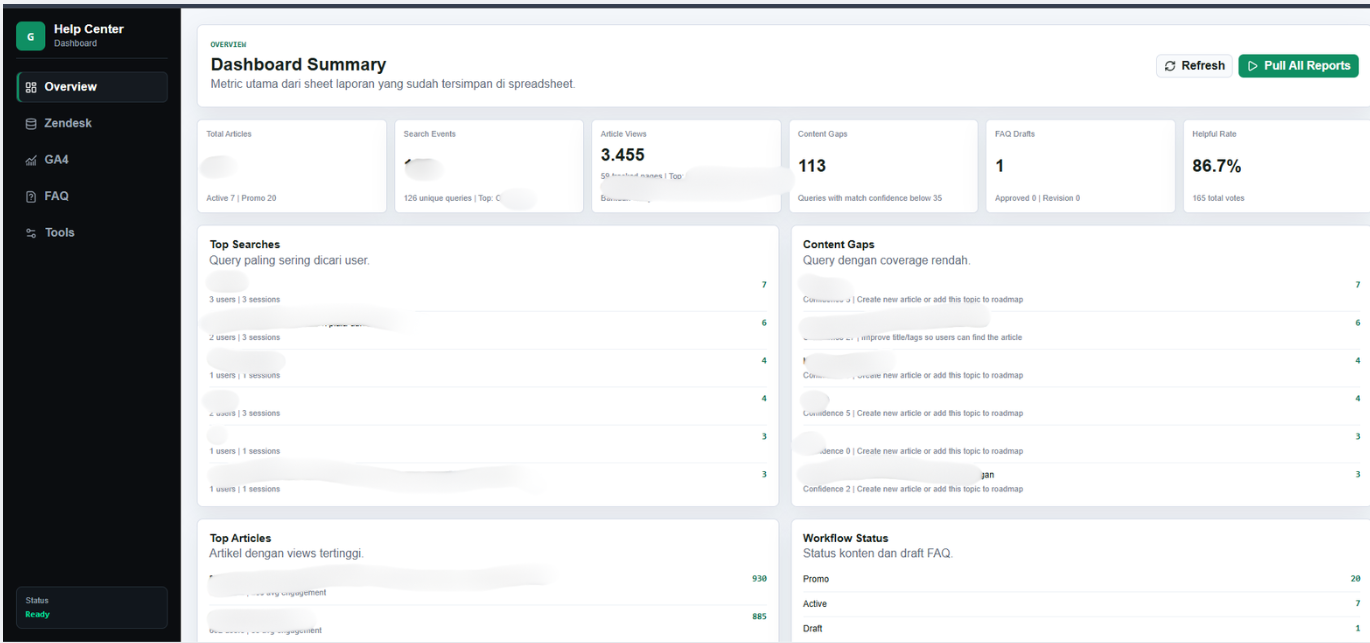
Apps Script web app overview dashboard showing sidebar, KPI cards, top searches, content gaps, top articles, and workflow status.

Web app overview dashboard

The deployed web app is not only a command panel. It displays live metrics from Google Sheets, including total articles, GA4 search events, article views, content gaps, FAQ draft count, helpful rate, top searches, and workflow status.
Add screenshot: docs/assets/evidence/faq-workflow-dashboard.png
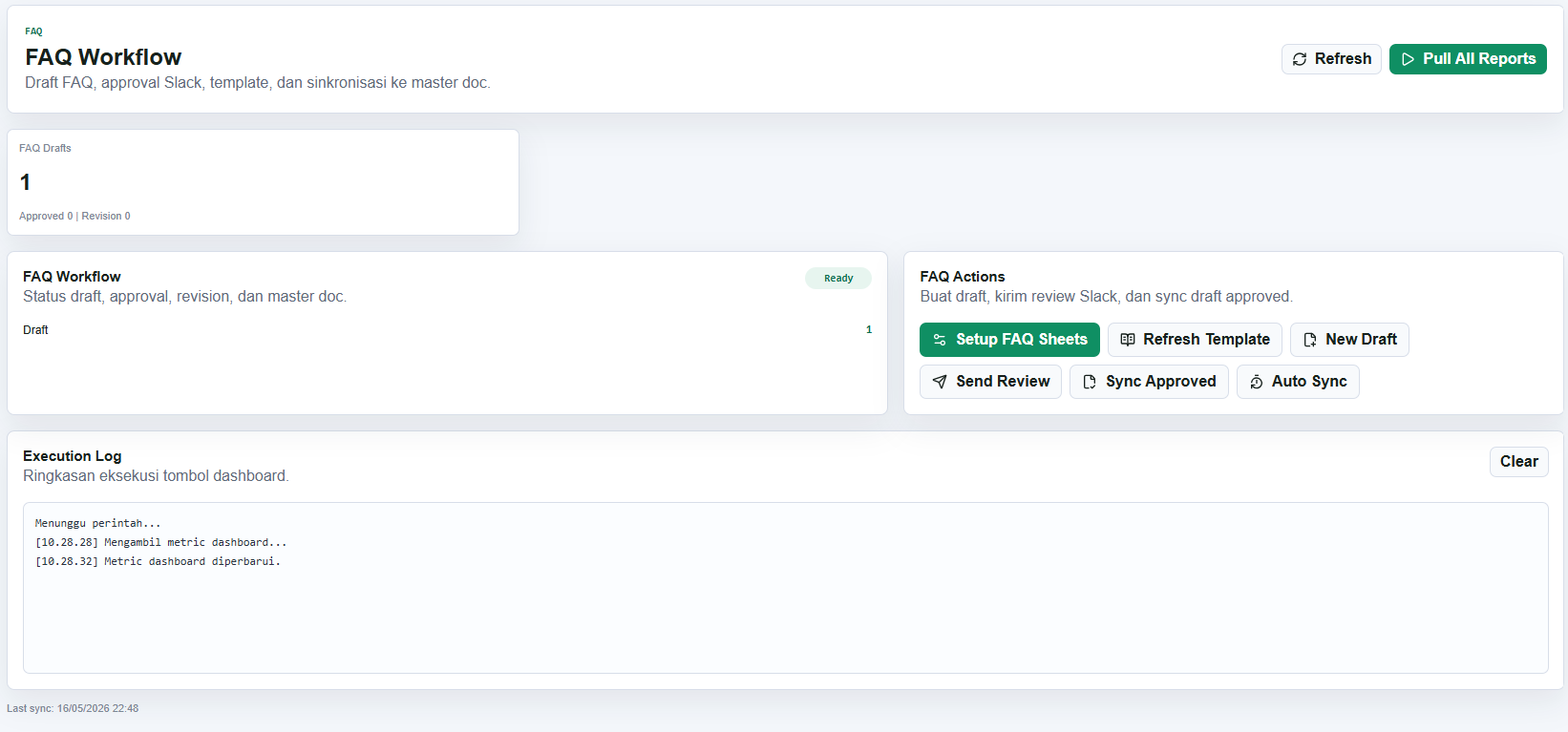
FAQ workflow screen with FAQ Drafts metric, workflow status, FAQ actions, and execution log.

FAQ workflow dashboard

The FAQ tab shows draft status and action buttons for setting up FAQ sheets, refreshing the template, creating a new draft, sending review, syncing approved drafts, and installing automatic sync.

Add screenshot: docs/assets/evidence/slack-review-buttons.png
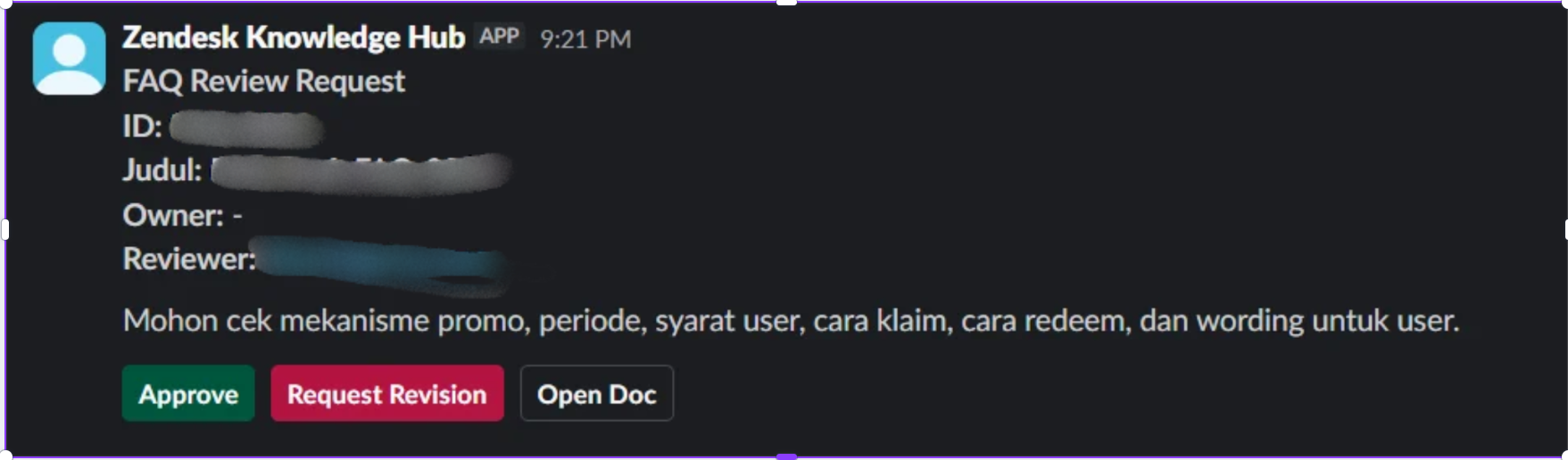
Slack FAQ Review Request message with Approve, Request Revision, and Open Doc buttons.

Slack review approval flow

Reviewers receive a Slack DM with the FAQ ID, title, owner, reviewer, review instructions, and action buttons. They can approve, request revision, or open the Google Doc directly from Slack.

Add screenshot: docs/assets/evidence/sheets-dashboard-report.png
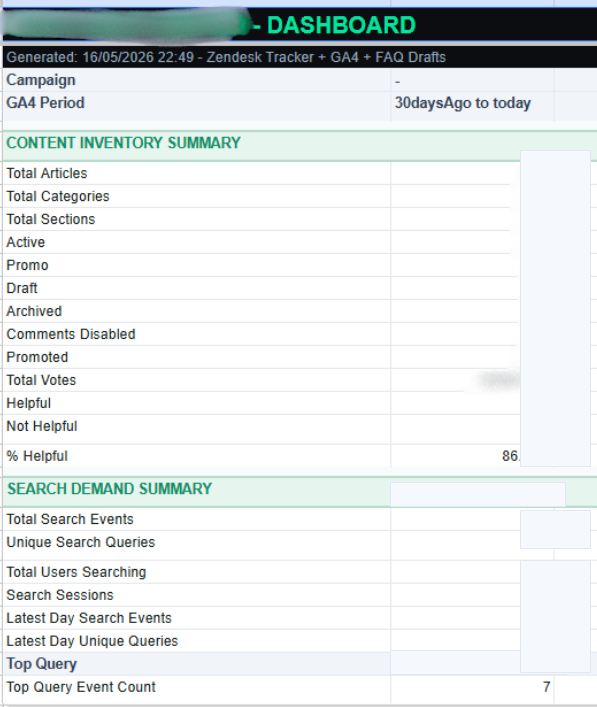
Google Sheets Dashboard report showing content inventory summary and search demand summary.

Generated Google Sheets report

The system writes a finished report to the main Dashboard sheet, combining Zendesk content inventory, GA4 search demand, article performance, content gaps, and FAQ workflow metrics.

Complete Feature Coverage

The production version is designed as an operational dashboard, automated sync tool, and FAQ review workflow in one Apps Script app.

One-click full report sync

The Pull All Reports action runs Zendesk sync first, then GA4 sync, then refreshes the main Dashboard sheet and web app metrics. This creates one finished report instead of separate manual exports.

Automatic scheduled sync for approved FAQ drafts

The Auto Sync action installs a time-based Apps Script trigger. Approved FAQ drafts can be appended to the master Google Doc automatically on a recurring schedule, so the team does not need to manually check approved rows every time.

Zendesk Guide article sync

Pulls categories, sections, article metadata, labels, votes, promoted/draft state, timestamps, and full article body from the Zendesk Help Center API into structured Google Sheets tabs.

GA4 search demand and article performance

Reads GA4 Help Center data, parses user search terms from Zendesk search URLs, tracks article page views, total users, sessions, engagement seconds, and engagement rate.

Content gap detection

Compares GA4 search queries against the Zendesk article tracker. Low match confidence queries are surfaced as content gaps with recommended actions such as creating a new article or improving titles and tags.

Web app dashboard by category

The web app has separate sections for Overview, Zendesk, GA4, FAQ, and Tools. It displays KPI cards, top searches, content gaps, top articles, workflow status, and operational action buttons.

FAQ draft creation and Google Docs workflow

Creates new FAQ draft Google Docs from the web app, logs each draft into the FAQ Drafts sheet, supports owner/reviewer/source fields, and keeps a master document for approved FAQ content.

Slack review buttons

Sends FAQ review requests to Slack with Approve, Request Revision, and Open Doc buttons. The interaction updates the FAQ Drafts sheet so review status stays visible in the dashboard.

Sheet formatting and safe reset tools

Includes formatting helpers for readable Sheets, dropdown status validation for FAQ drafts, and a safe clear action that deletes report tabs while preserving FAQ Drafts and FAQ Template.

Key Features

Built for support teams who need operational reporting, content gaps, and review workflow in one place.

Sheets

Sheet-first dashboard

Every report is written to readable Google Sheets, while the web app presents the same metric in a cleaner dashboard UI.

Search

Search demand analysis

Parses Help Center search terms from GA4 and compares them against Zendesk content coverage.

Review

FAQ review workflow

Creates draft Google Docs, tracks status in Sheets, and sends Slack review buttons for approval or revision.